Senior Product Designer · Geneva
Mazin Housin
I turn complex rules and systems into interfaces people understand and trust.
Senior Product Designer at BuzzBrothers. Three projects below, each with the screens and the reasoning behind them. Tap any numbered marker to see the decision behind it, or switch on Design notes to see how this page itself was designed.
Client brand names, products and people are anonymised for confidentiality.
I also have a developer background: web at CERN and a Vue.js front end for Ericsson. I still prototype in code when a Figma frame can’t answer the question.
Case 01 · LumaGuard and LumaFlow
Designing issue reports people trust and act on
LumaGuard shows designers and auditors the dark patterns on any page, explains each one and points to it.
LumaFlow turns any web page into editable Figma layers, so designers can start from the real thing.
- Role
- Design and build, solo
- Platform
- Chrome extension
- Status
- Published on the Chrome Web Store
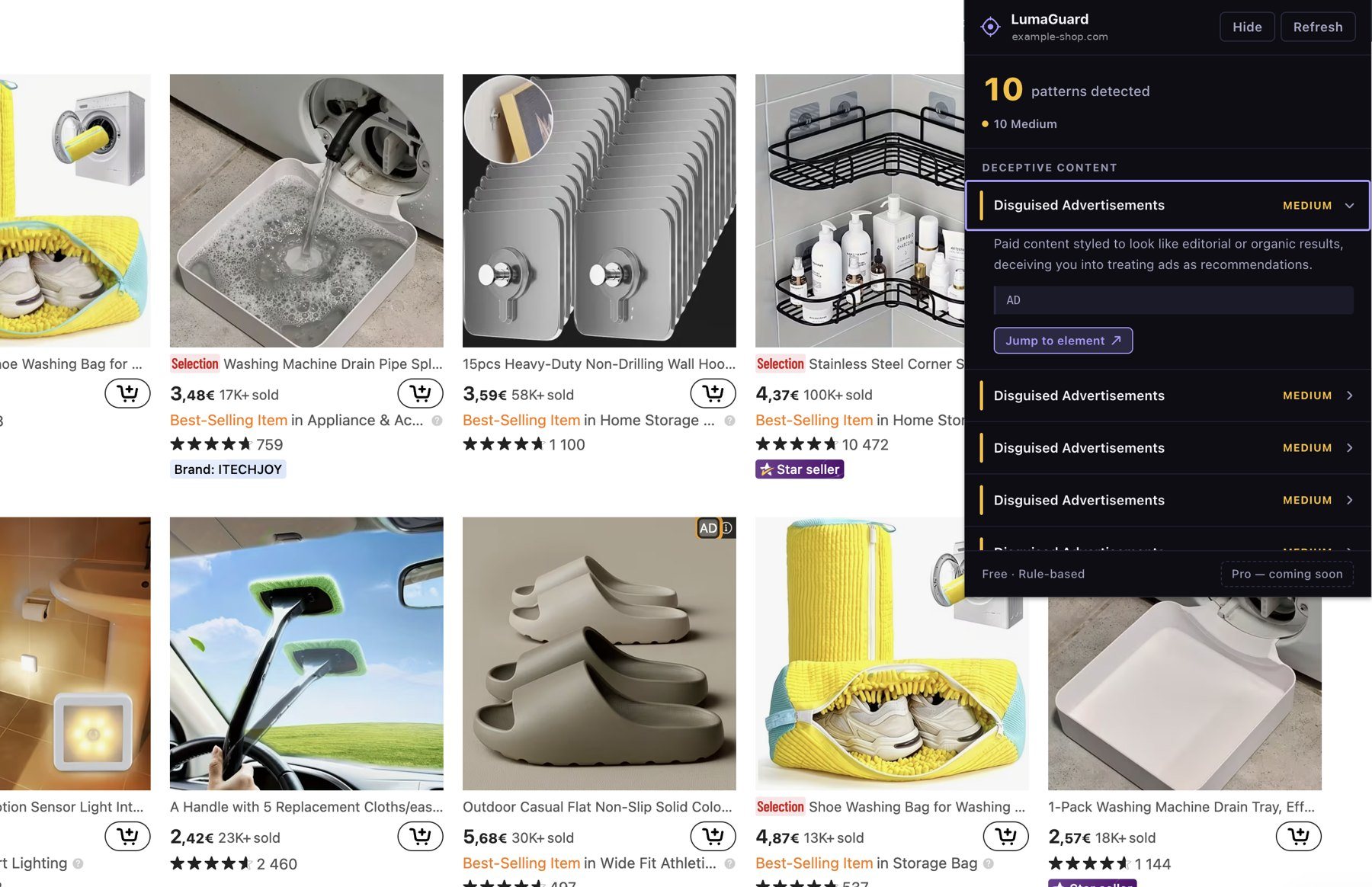
Anatomy of an issue: eight decisions in one panel
Tap a marker or a line to link them.
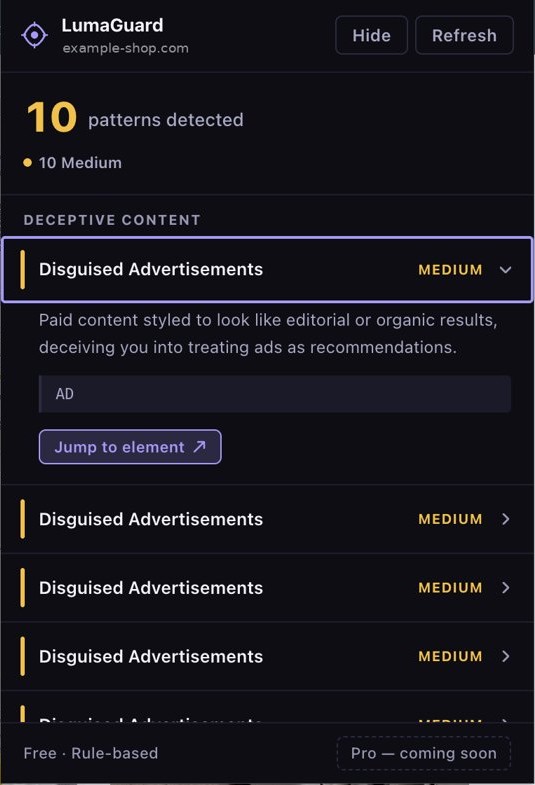
- 1Hide, never blockThe page stays as it is, and the panel hides at any time.
- 2Size of the problem firstThe count and the severity mix, before any detail.
- 3Grouped by categoryRelated issues read together.
- 4Severity as a word and a colourNever colour alone.
- 5Plain-language explanationWhat it is and why it misleads, for non-experts too.
- 6The evidenceThe exact content that matched the rule.
- 7Jump to elementScrolls the page to it and highlights it.
- 8Says how it decidesRule-based, so people know what to expect.
Next iteration: ten identical rows repeat one issue. I’d group them as “Disguised advertisements × 10” and let people step through each one.
LumaFlow: every technical limit became a decision about the experience
Building it myself meant I knew which limits were real and which were negotiable. Each one changed what the designer gets.
| The limit | What the designer gets |
|---|---|
| Broad permissions put people off at install | Only the active tab is requested, so the install prompt reads as safe |
| Sticky headers repeated in every captured strip | The header appears once in Figma, the way a designer expects |
| Figma rejects images over 4,096 px | Tall pages still arrive, tiled, instead of failing |
| Browser storage broke long pages | Nothing is kept between steps, so nothing stays on the user’s machine |
| Chrome caps messages inside an extension | Long pages capture reliably, one strip at a time |
Case 02 · Paris Saint-Germain
Loyalty and ticketing for Paris Saint-Germain
- Role
- Senior UX Designer
- Agency
- BuzzBrothers
- Status
- Loyalty live · ticketing in development
LIVE
MyParis loyalty programme redesign
The club’s loyalty programme for members worldwide, redesigned end to end.
IN DEVELOPMENT
Ticketing platform
Match tickets, season tickets, hospitality, resale, and the back-office tools club staff use. Still in development, so I can’t show it yet.
What I’d keep and change on the live seat selection
I benchmarked twelve ticketing flows, football clubs first plus Ticketmaster, SeatGeek, TickPick and SeatPlan, and applied the findings to PSG’s live seat selection. Switch to my concept to see the same points solved, on a fictional club. Both are separate from the design in development.
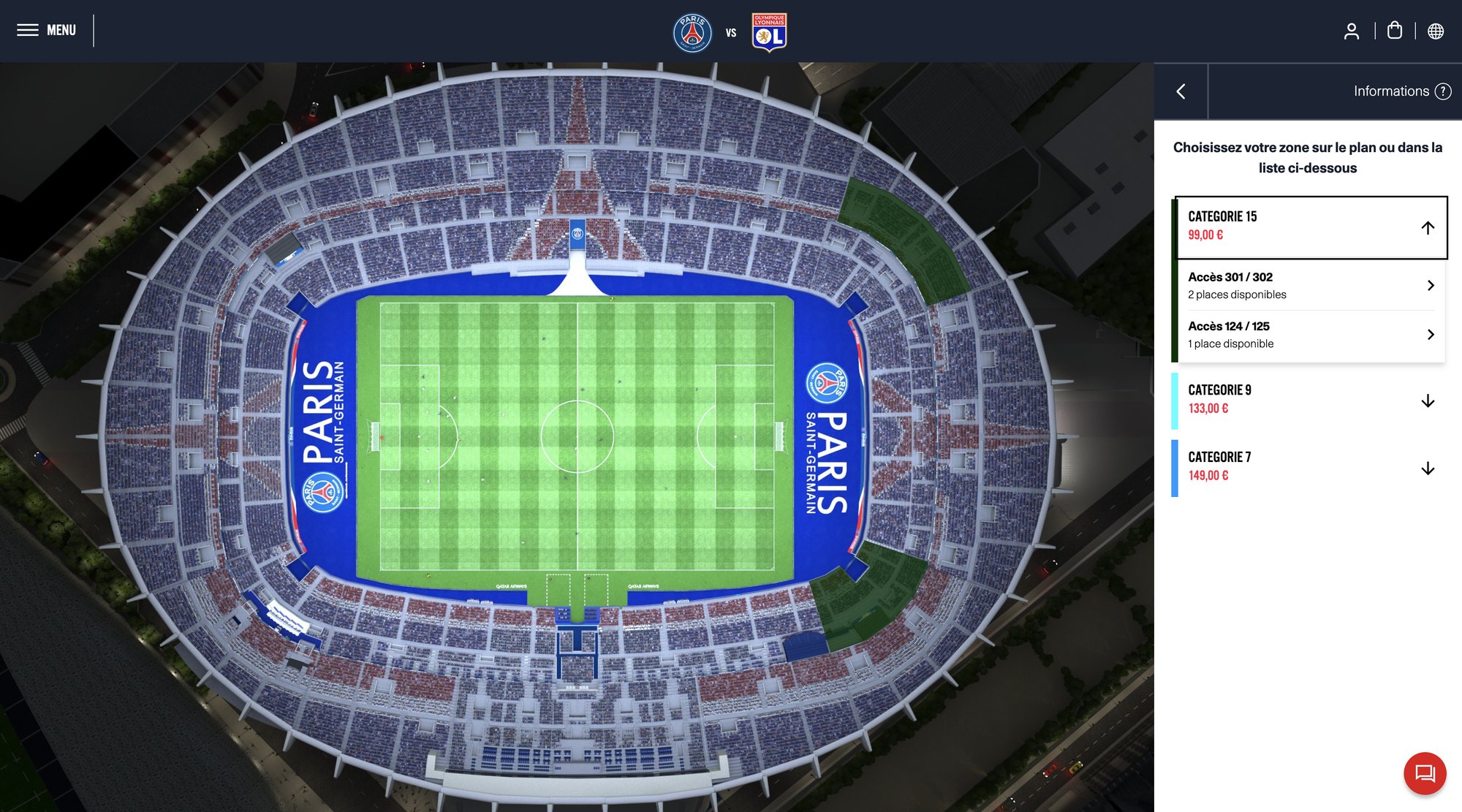
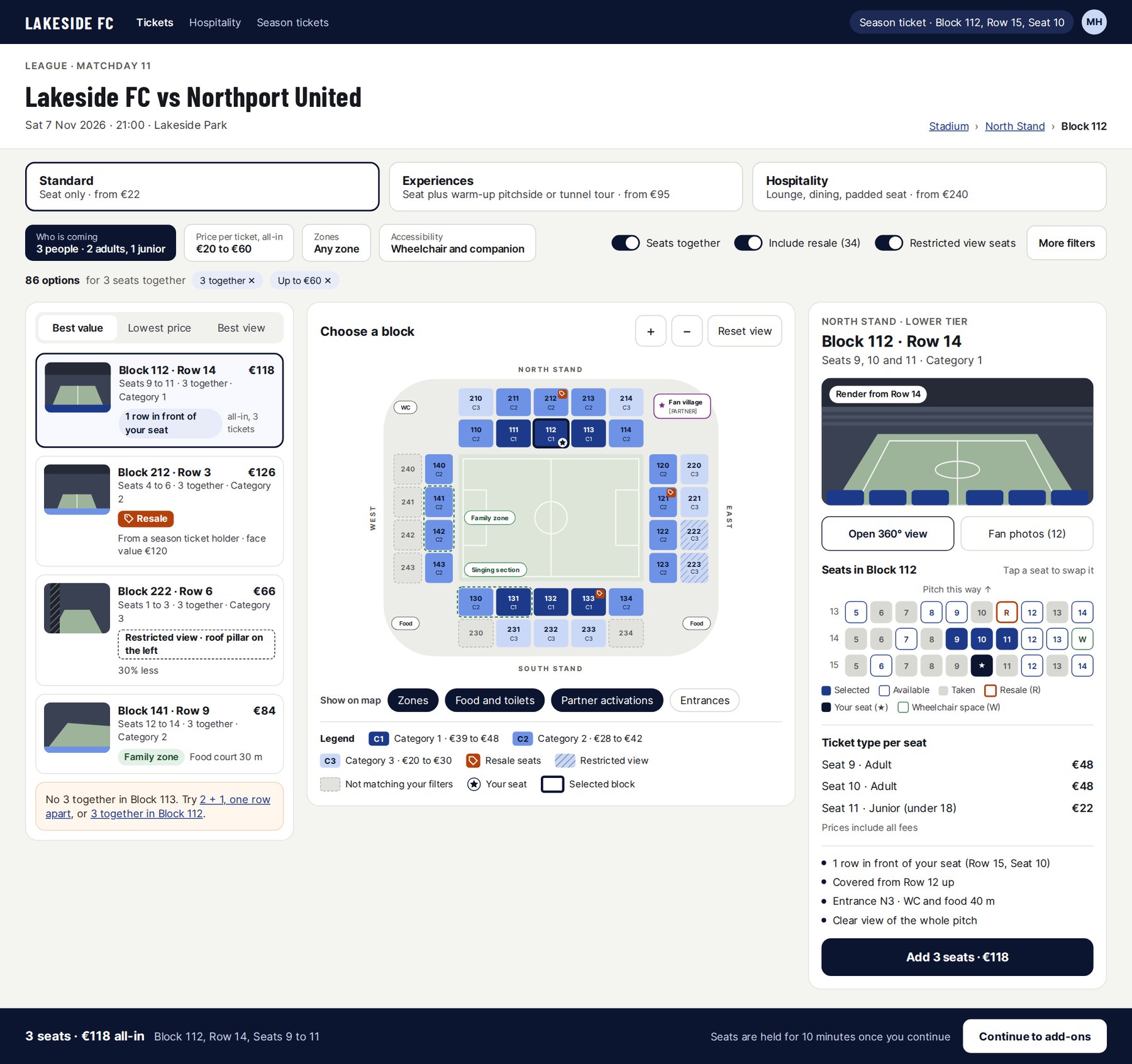
- 1Say what the match isCrests alone. Add competition, date, kick-off and venue in text, which screen readers can read too.
- 2Specific help“Informations” is vague. Link to what fans look for: accessibility, resale, children’s tickets.
- 3Map or list, your choiceBoth paths lead to the same result. Keep it.
- 4Name categories for fans“Catégorie 15” means nothing on its own. Name it by stand and level, and say what’s included.
- 5All-in price per seatSay whether 99,00 € is per seat and includes fees.
- 6One category open at a timeThe accordion keeps the list short and focused. Keep it.
- 7More than an access numberShow stand, row, whether seats sit together, and a view from the seat.
- 8Never colour aloneA thin colour bar is the only link to the map, and the cyan and blue are close. Add labels or patterns.
- 9Ask who is coming firstNumber of tickets before categories, plus resale and wheelchair filters.
- 10Use the empty panelShow the selection, the total, a hold timer and a clear next step.
- 11Highlights that disappearSelected zones turn dark green on a night render. Choose on a neutral 2D map; keep 3D to confirm the view.
- 12Name the standsNo stand names, legend or “from” prices on the map.
- 13Zoom, reset, orientationAdd zoom and reset controls, and keep the orientation fixed.
Case 03 · Loyalty for a tobacco brand
From a loyalty strategy to a programme adopted by HQ in 20+ markets
- Role
- Senior UX Designer
- Context
- Regulated category
- Users
- HQ, market teams, consumers
[TOBACCO BRAND] A
The programme
Referral wasn’t producing the activity HQ expected. I redesigned the rules and the flow together. It is now the standard in 20+ markets.
[TOBACCO BRAND] B
The strategy
A loyalty strategy and its page for a second brand. It wasn’t taken forward by the client.
Redesign the rules and the screens together, so they tell the same story
The hardest part was getting HQ and regional teams to agree on one model every market could run.
1 · Set once
HQ defines the model
Who earns what, and when a referral pays off.
2 · Run locally
Markets adapt it
Language, legal rules and local rewards, without rebuilding.
3 · Experienced
Consumers take part
Join, earn, refer and redeem in a flow that matches the rules.
Club checkout: points, coupons and referral rules in one flow
Every branch covers a real case: an expired coupon, points that no longer cover the total, a failed payment, a pending order. Referral codes are deliberately excluded from coupons.
A hidden offer, many ways in, one place to land
Codes hidden on the website, Instagram, influencer posts, CRM, shops and partners all lead to one hidden landing page and checkout. Each entry point has its own tracked link, and DM automation answers a correct code with the link.
The data showed the next problem wasn’t the interface
Later I analysed the login, redemption and referral funnels in GA4. The drop-offs pointed to the value of the programme as much as the flow.
How I work
Designing with AI, and for AI output people can trust
In my process
Interactive prototypes in code, to test behaviour a static frame can’t show.
A first read of research notes and data, before I go deeper myself.
I verify what it produces against the source: it sounds confident even when it’s guessing.
In the interface
Show where a suggestion comes from, so people can judge it.
Let people accept, edit or dismiss it, and never apply it silently.
Say what it can’t do, the way LumaGuard says it’s rule-based.
Also happy to talk about
Other work
- Design system, [Tobacco Brand] AContributed from its inception: components, shared patterns, helping markets adopt it
- Step-by-step product pageA crowded mobile page turned into one decision at a time
- Sign-up, eight fields to three stepsMobile-first, regulated, tested with real users before rollout
- In-store screensInterfaces for exploring products in shops, linked to the online journey
- MarineTrafficProduct role on a data-dense platform with 1M+ monthly users